
Q&A
1. How is the data stored?
All content is stored locally in the browser (localStorage), requiring no backend database. You can optionally sync it to a GitHub repository.
2. Why can't I see my bookmarks on different devices?
Since it is a pure front-end application, if you haven't configured the GitHub sync feature, data is only saved in the current device's browser. Once GitHub sync is configured, your bookmarks will stay in sync across multiple devices.
3. Bookmarks are not up to date?
Check if your network connection is normal. It might also be due to browser caching; please try Ctrl + F5 for a forced refresh. If that doesn't work, press F12 to open Developer Tools and clear the cache completely. 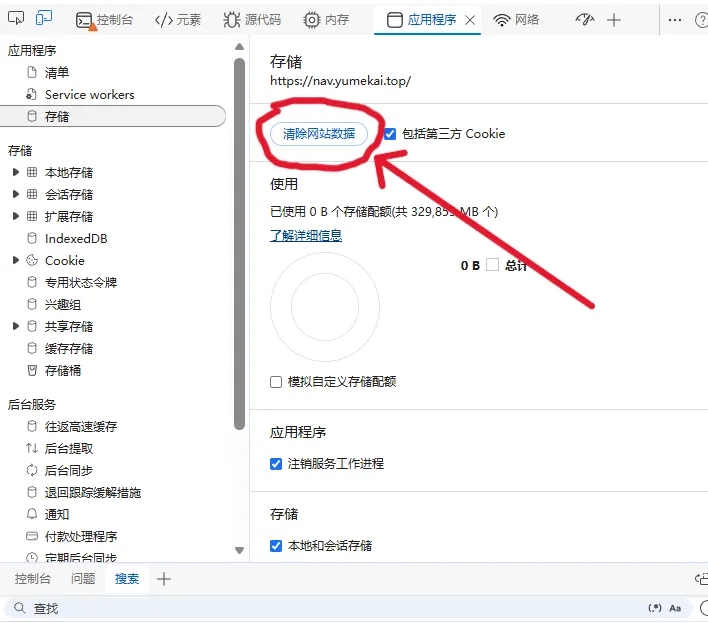
4. What if I forgot my password?
If you forget your password, please reset the ADMIN_PASSWORD variable in your cloud provider's console and redeploy. For local deployments, modify the .env file directly and restart the service. If no environment variable is set, the default password is admin1234.
5. Priority and Conflict between Environment Variables and UI Settings?
- Priority Rule: UI Custom Settings (Browser
localStorage) > Deployment Environment Variables.- If you configure or update the repository or token in the web interface, the system prioritizes the UI values and persists them locally.
- Deployment environment variables are only used as fallback defaults when no local UI settings exist.
- Partial Updates (e.g., changing only the repository address):
- Modified fields will use the new values, while unchanged fields retain their existing settings (or inherited environment variables).
- During synchronization, the system uses the currently active token to access the target repository. Ensure the token has read/write permissions for the target repository, otherwise you may receive a
404 Not Foundor403 Bad credentialserror.